Calendar - Easy Planner
- 4.6
- Rating
- 1.00M
- Installs
- Free
- Price
 Analysis by App-foxy
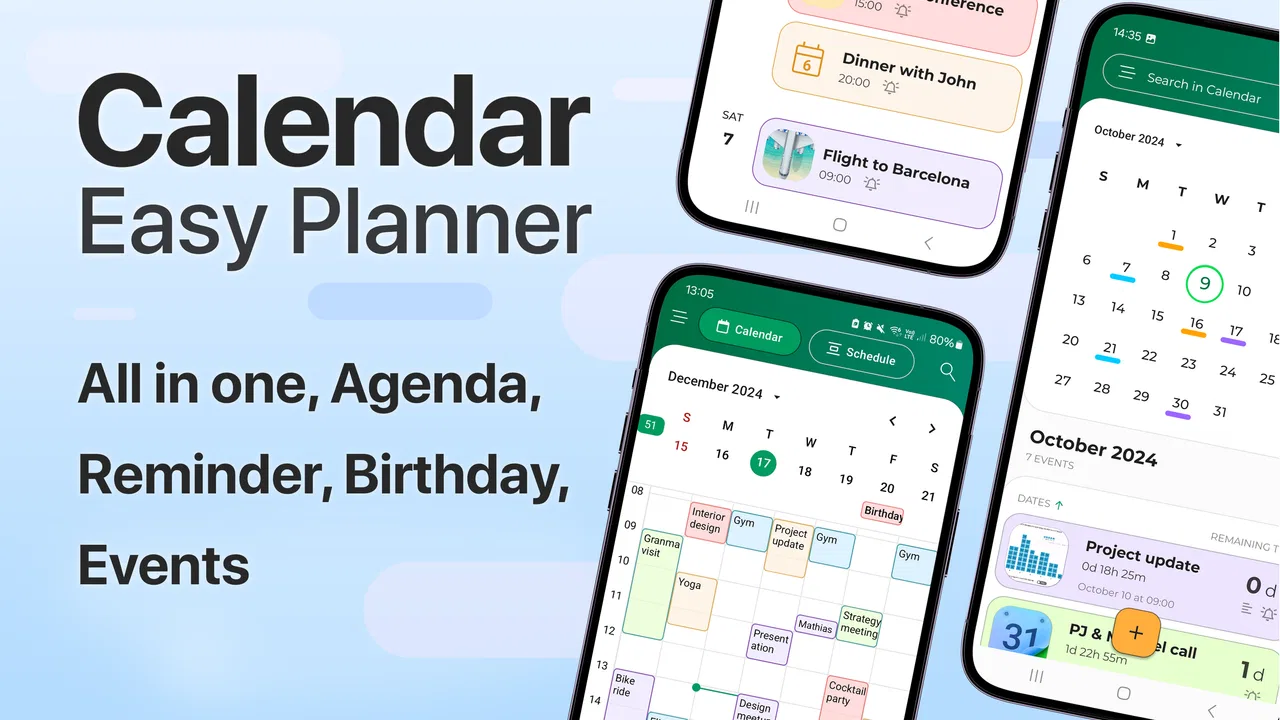
I’ve always found that the best calendar is not necessarily the one with the longest feature list. It is the one I can open quickly, understand at a glance, and trust enough to use every day. Calendar - Easy Planner takes that straightforward approach. It is a free productivity app from Glad Appvestor, built for planning, scheduling, and reminders without making the calendar feel like a project of its own.
After spending time with it, my impression is that this is aimed at people who want a cleaner daily planning habit rather than a full work-management system. It fits naturally between a paper planner and a feature-heavy digital calendar. The app is available for Everyone and works on devices running Android ten or later. Its current version is 3.3, and the overall product feels focused on the basics: seeing what is ahead, putting commitments into place, and reducing the chance that an important task slips through the day.
My short verdict is simple: Calendar - Easy Planner is most useful when you value low friction over endless customization. It is a sensible choice for personal schedules, study planning, appointments, errands, and recurring reminders. I would look elsewhere if I needed a shared team calendar, a deeply integrated business workflow, or a sophisticated project-planning environment.
You May Also Like

 Blood Strike: 2.5 Anniversary
Blood Strike’s Loadouts Turn Every Drop Into a Tactical Gamble
A close look at Blood Strike’s custom loadouts: how fast access to signature weapons reshapes its battle royale rhythm, rewards preparation, and narrows the gap between fights.

 Pandora - Music & Podcasts
Pandora’s Music Is Easy to Start, but Harder to Recover
Pandora’s strength is its low-effort path from a seed to a station. Its weak spot is how much confidence it asks you to place in connection, setup, and quiet recovery.

 8 Ball Pool
 Is Built on Rivalries, Rematches, and Routine
A close look at the rivalries, rematches, shared routines, and unanswered safety questions that turn a quick pool match into a persistent mobile community.

 Samsung Music
’s Quiet Strength Is Playing What You Already Own
Its reach comes less from spectacle than from dependable access to a personal library. That simplicity is both the app’s strongest retention engine and its ceiling.

 AccuWeather: Weather Radar
AccuWeather Review: A Quick, Clear Forecast for Everyday Decisions
For everyday plans, the best forecast is the one you can understand quickly. AccuWeather makes rain timing, radar, and local conditions easy to act on, with a few trade-offs.

 Hill Climb Racing
Why Hill Climb Racing Still Turns Crashes Into One More Run
A tiny car, a bumpy hill and one more upgrade: Hill Climb Racing keeps resurfacing because its simple chaos makes every near-miss feel personal.
More From Our News Desk



How the app feels in everyday use
I find the app most useful when I treat it as a quick checkpoint, not another place to manage an elaborate system. In everyday use, that means checking what is coming up, adding commitments while they are fresh, and choosing reminders that give me enough time to act. That practical rhythm makes it easier to judge where its simplicity saves effort—and where a more connected calendar would serve me better.
A calm starting point for personal planning
The first thing I noticed is that Calendar - Easy Planner makes sense as a personal control panel. Instead of asking me to build a complicated system before I can benefit from it, it encourages a simple rhythm: check the calendar, add what matters, and use reminders to protect the important parts of the day.
That simplicity is particularly helpful on a phone. A mobile calendar has to work when I am standing in a shop, walking between appointments, or trying to organize tomorrow before going to bed. The less mental effort required to record something, the more likely I am to record it correctly. This app’s uncomplicated identity works in its favor because it keeps the focus on the schedule rather than on managing the tool.
I can imagine using it for a mixture of fixed events and flexible plans. A medical appointment, a study session, a bill reminder, a grocery trip, and a personal deadline do not all have the same importance, but they can all benefit from being visible in one place. The value is not in turning every activity into a formal task. It is in giving everyday commitments a reliable home.
A realistic day with Calendar - Easy Planner
Consider a typical weekday. I might begin by checking the day’s appointments, then add a reminder for an errand I need to complete after work. Later, I could schedule an evening study block and set a reminder early enough to prepare rather than react at the last minute. The calendar becomes a lightweight sequence of prompts instead of a list I only consult when something goes wrong.
The important detail in this workflow is timing. I would not use reminders only at the exact moment an activity starts. For preparation-heavy commitments, an earlier prompt is more useful: it gives me time to pack, travel, gather documents, or finish what I am doing. For small tasks, a closer reminder may be enough. This is a practical way to get more from a simple calendar without needing an elaborate productivity method.
I also like the idea of separating “must happen” events from “would be good” plans through placement and timing. If the day becomes crowded, the calendar makes the conflict visible. That helps me make a decision before the schedule becomes unrealistic. A digital calendar cannot solve overbooking by itself, but it can expose the problem earlier than a scattered collection of notes.
Who will appreciate the uncomplicated design
This app should appeal to students, parents, freelancers, shift workers, and anyone who wants a personal schedule that is easier to maintain than a paper notebook. It is also a reasonable starting point for someone moving from loose reminders or chat messages into a more dependable planning routine.
Students can use it to place classes, revision sessions, assignment deadlines, and personal plans on the same timeline. Parents may find it useful for appointments, school-related commitments, and household reminders. Freelancers can reserve time for focused work while keeping personal obligations visible. None of these users necessarily needs a full collaboration suite; they need a calendar they will actually open and update.
The Everyone content rating also makes the app suitable for a broad audience. That does not mean every person will find it equally useful. A person who already relies on a highly connected calendar ecosystem may prefer to stay there, especially if they depend on shared schedules, organization accounts, or advanced integrations.
Where it sits beside familiar alternatives
Compared with a paper planner, Calendar - Easy Planner offers the obvious advantage of reminders. A notebook can show a beautiful overview, but it cannot actively prompt me when a task is approaching. The digital format is also easier to adjust when plans change, although some people will still prefer the tactile control and visual freedom of paper.
Compared with a large ecosystem calendar, this app’s appeal is its narrower focus. Established calendar platforms often connect appointments, contacts, email, video meetings, shared calendars, and workplace accounts. That depth is valuable when a schedule depends on other people or services. It can also make the experience feel heavier than necessary for a personal routine.
Compared with a dedicated task manager, this app is better suited to time-based commitments than to long lists of projects. A task manager usually handles subtasks, labels, priorities, and progress more naturally. Calendar - Easy Planner makes more sense when the question is “When should this happen?” rather than “Which stage of this project is complete?” Choosing between them depends on whether time or task structure is the center of the problem.
What the current release tells me
The current version, 3.3, suggests a product that has moved beyond a first experimental build and is being maintained as a usable everyday tool. I would not treat a version number as proof that every advanced need has been addressed, but it does give the app a more established feel than an untouched launch release.
The app was released on November 29, 2024, so its development story is still relatively recent. That matters when judging expectations. I see a focused foundation rather than a mature replacement for every calendar platform. The right question is not whether it contains every possible calendar function; it is whether the current experience handles simple planning consistently enough to earn a place on the phone.
Its store presence also shows meaningful user adoption: it has passed one million installs, with an average rating of 4.5 from around 3.8 thousand ratings and 503 written reviews. I read those figures as encouraging evidence that the basic idea connects with users, while remembering that popularity does not automatically make an app suitable for a specialized workflow.
What changed for existing users
For someone already using an earlier build, the most important effect of version 3.3 is likely continuity. A calendar becomes useful only when it becomes habitual, so stability and familiarity matter more here than dramatic visual novelty. Existing users do not want their planning routine disrupted every time they open the app.
At the same time, a current release creates a reason to revisit the app’s everyday fit. I would check whether event entry still feels quick, whether reminders are easy to understand, and whether the calendar remains readable when several commitments land on the same day. Those are the details that determine whether an update improves real use, even when they are less exciting than a headline feature.
One practical tip is to review the next seven days immediately after installing or updating. That makes it easier to spot duplicate entries, missing reminders, or plans that need more preparation time. I also recommend entering a few genuinely recurring commitments first rather than filling the calendar with every possible idea. A smaller, accurate schedule is more useful than a crowded one that I stop trusting.
Three workflows that make the simple approach stronger
First, I would use the app as a “transition planner.” Instead of recording only the event itself, I would add reminders for the steps that make the event possible: leaving home, collecting paperwork, charging a device, or preparing materials. This turns a calendar from a passive record into a practical chain of prompts without requiring a separate task system.
Second, I would use it for weekly capacity checks. At the start of the week, I would scan the schedule for clusters of appointments and protect open periods for recovery, study, or focused work. The insight is that empty time is not automatically spare time. Treating it as reserved capacity can prevent the common mistake of filling every gap with another commitment.
Third, I would keep flexible intentions visibly separate from hard appointments by choosing different times or reminder patterns. A fixed appointment deserves a stronger commitment than a “maybe” errand. If both are treated identically, the calendar can become noisy and stressful. The app is simple enough that this discipline has to come from the user, but that can also make the system easier to understand.
Where the experience may fall short
The same simplicity that makes the app approachable may limit people who want a complete productivity environment. If I needed detailed project breakdowns, team assignments, extensive categorization, or a calendar connected to a large organization, I would probably choose a more specialized alternative. A personal planner is not automatically a workplace scheduling system.
There is also a trade-off in depending heavily on reminders. Notifications can protect important plans, but too many can create background noise. I would be selective, especially with recurring items. If every minor activity generates an alert, I may start dismissing reminders without reading them. The app can support a planning habit, but it cannot decide which commitments deserve attention.
Another consideration is the pricing model. The app is free to download and use as a starting point, while in-app purchases range from $2.99 to $39.99 per item. That broad range means I would inspect the purchase screen carefully before paying, especially if I only need basic scheduling. The free entry point is attractive, but users should decide whether any optional upgrade solves a problem they genuinely have rather than buying simply because a premium option is available.
I would also avoid judging it solely by the number of features it does not advertise. For a person who wants a clean calendar, restraint can be a strength. For someone who expects a complete replacement for a connected account calendar, the narrower scope may feel restrictive. The app is best evaluated against the user’s routine, not against the most feature-packed competitor.
Questions I would ask before installing
Is it suitable for a basic personal schedule? Yes. That is where I think it makes the most sense: appointments, reminders, study periods, errands, and personal planning that benefit from a clear time-based view.
Can it replace every calendar tool? I would not assume that. If my routine depends on shared calendars, work accounts, complex collaboration, or extensive integrations, I would first compare those needs with the app’s focused approach. A simpler calendar may be better for personal use but insufficient for a team.
Is the free version enough to begin? It provides a free way to try the app, which is important because the best test is whether I naturally remember to open it and keep it updated. I would use it for a normal week before considering any in-app purchase. That reveals more than a quick first impression.
Will it help someone who often forgets tasks? It can help when the problem is remembering time-sensitive commitments, especially if reminders are set with enough preparation time. It will not replace prioritization or solve an overloaded schedule. If I keep adding obligations without reviewing them, the calendar will simply reflect the disorder.
Is it appropriate for younger users? The Everyone rating makes it broadly accessible, but the usefulness still depends on the person’s planning needs. A child, student, or adult may use the same basic tool differently; the app’s value comes from how thoughtfully the schedule is maintained.
What I would watch as the app develops
Because the product is still relatively recent, I would watch how Glad Appvestor balances simplicity with depth in future releases. The strongest path would be improving the everyday planning flow without turning the app into a crowded dashboard. Faster entry, clearer scheduling, and dependable reminders would matter more to me than a long list of decorative additions.
I would also pay attention to how the app handles the boundary between personal planning and more advanced use. There is room for useful growth, but each added layer should earn its place. If new options make the calendar harder to scan or slower to update, the original advantage could disappear.
For existing users, the practical test is whether updates preserve confidence in the schedule. I would keep an eye on how familiar workflows feel after each release and whether the app continues to make tomorrow easier to organize. That is a better measure of progress than simply counting new controls.
My final recommendation
Calendar - Easy Planner is a convincing choice for people who want a straightforward productivity calendar rather than an all-purpose work platform. I like its clear purpose, accessible starting point, and suitability for ordinary routines. The combination of planning, scheduling, and reminders is enough to support a useful habit when I keep the calendar selective and realistic.
I would recommend it to a friend who currently relies on memory, scattered notes, or an overcomplicated system for personal commitments. I would not recommend switching blindly if that person depends on shared work calendars, deep integrations, or detailed project management. In those cases, a more connected alternative may be worth the extra complexity.
Overall, the app earns its place by making basic planning feel approachable. Its free availability, Everyone rating, and current 3.3 release make it easy to try, while the optional purchases give users room to decide whether they need more. If your main goal is to see what matters, schedule it sensibly, and receive useful reminders without building a productivity machine, Calendar - Easy Planner is worth trying.
FAQs for Calendar - Easy Planner
01What platforms is Calendar - Easy Planner available on?
Calendar - Easy Planner is available for both Android and iOS devices. This ensures that users across different platforms can seamlessly integrate the app into their daily routines, making it accessible for a wide audience. You can download it from the Google Play Store for Android or the Apple App Store for iOS.
02Does Calendar - Easy Planner offer synchronization with other calendars?
Yes, Calendar - Easy Planner supports synchronization with popular calendars like Google Calendar, Outlook, and iCloud. This feature ensures all your appointments and events are consolidated in one place, reducing the risk of double bookings or missed meetings. You’ll need to grant necessary permissions for this synchronization.
03Are there any in-app purchases or subscription fees?
Calendar - Easy Planner offers both free and premium features. While the basic app is free to use, a subscription unlocks advanced features such as custom reminders, additional themes, and ad-free experience. Users can choose a monthly or yearly subscription based on their needs.
04How user-friendly is Calendar - Easy Planner for beginners?
Calendar - Easy Planner is designed with a focus on simplicity and ease of use. The intuitive interface allows users to quickly navigate through features, set up events, and manage tasks without any prior experience. A tutorial is available upon first use to guide new users through the basic functionalities.
05Is my data secure with Calendar - Easy Planner?
The app prioritizes user privacy and data security. Calendar - Easy Planner uses encryption protocols to protect your information. Additionally, it adheres to privacy regulations and does not share personal data with third parties without user consent, ensuring a secure user experience.
Pros
- User-friendly interface for easy navigation.
- Customizable themes enhance visual appeal.
- Integrates seamlessly with other apps.
- Supports multiple calendar views.
- Reliable notifications for important events.
Cons
- Limited free features available.
- Occasional sync issues reported.
- Ads can be intrusive in free version.
- No offline mode for event creation.
- Lacks advanced task management tools.

Calendar - Easy Planner
Gallery